FishWeather: Marine Forecasts
- 4.8
- Rating
- 100.00K
- Installs
- Free
- Price

 Analysis by App-foxy
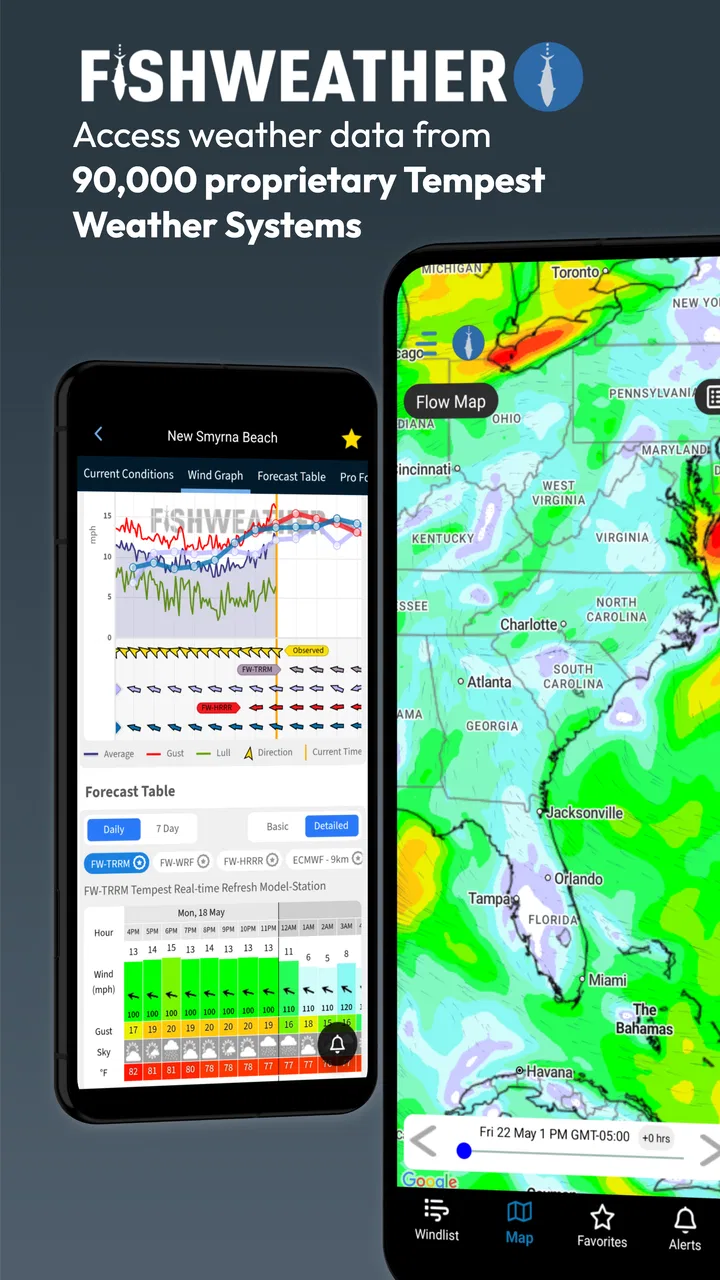
When I first opened FishWeather: Marine Forecasts, I understood its appeal quickly: it is built for people who need more than a simple “sunny” or “rainy” answer. The focus is marine conditions, so the useful questions are about wind, waves, tides, radar, and alerts. That makes it a very different kind of weather app from the one I might use to decide whether to carry an umbrella.
In my experience, the app makes the most sense when weather is part of a plan rather than a passing curiosity. A fishing trip, a day on a small boat, a paddle along the coast, or even a shoreline walk can depend on conditions changing at the wrong time. FishWeather puts those concerns in the foreground, which is its main strength and also the reason it will not suit everyone.
The first week: useful information without the usual weather-app clutter
The first-week experience is strongest for anyone who already thinks in marine terms. Instead of forcing me to translate a general forecast into a decision about the water, the app presents the categories I actually care about: wind conditions, wave behavior, tides, and radar. That directness saves time. I do not have to jump between a general weather app, a tide website, and a separate marine forecast source just to build a basic picture.
You May Also Like

 Google Keep - Notes and lists
Google Keep’s Quiet Growth Shows the Appeal of Simpler Notes
As mobile work gets busier, Google Keep keeps winning a simple contest: capture a thought quickly, find it later, and get on with the day.

 Blood Strike: 2.5 Anniversary
Blood Strike’s Loadouts Turn Every Drop Into a Tactical Gamble
A close look at Blood Strike’s custom loadouts: how fast access to signature weapons reshapes its battle royale rhythm, rewards preparation, and narrows the gap between fights.

 Pandora - Music & Podcasts
Pandora’s Music Is Easy to Start, but Harder to Recover
Pandora’s strength is its low-effort path from a seed to a station. Its weak spot is how much confidence it asks you to place in connection, setup, and quiet recovery.

 8 Ball Pool
 Is Built on Rivalries, Rematches, and Routine
A close look at the rivalries, rematches, shared routines, and unanswered safety questions that turn a quick pool match into a persistent mobile community.

 Samsung Music
’s Quiet Strength Is Playing What You Already Own
Its reach comes less from spectacle than from dependable access to a personal library. That simplicity is both the app’s strongest retention engine and its ceiling.

 AccuWeather: Weather Radar
AccuWeather Review: A Quick, Clear Forecast for Everyday Decisions
For everyday plans, the best forecast is the one you can understand quickly. AccuWeather makes rain timing, radar, and local conditions easy to act on, with a few trade-offs.
More From Our News Desk



A realistic example would be planning an early fishing trip. I might check the forecast the evening before, look at the expected wind and waves, then return in the morning to see whether radar or alerts change the plan. The value is not simply seeing more weather information. It is having the relevant information together while deciding whether to go, delay departure, stay close to shore, or change the activity entirely.
The app is also helpful for people who are still learning how to read marine conditions. A general forecast can look harmless while wind direction, wave movement, or tide timing creates a very different experience at the water. FishWeather encourages a more complete check before heading out. The important habit is to read the conditions as a group, not to focus on one attractive number or one reassuring symbol.
Its presentation is more specialized than a mainstream weather app, so there is a short adjustment period. Someone who only wants the temperature for a commute may find the extra marine detail unnecessary. For a sailor, angler, or coastal recreation user, however, that detail is the reason to install it in the first place.
What makes the marine focus genuinely practical
The combination of forecasts, tides, waves, wind conditions, alerts, and radar gives the app a practical workflow rather than a single-purpose display. I can begin with the broad forecast, inspect the factors that affect comfort and safety on the water, and then use radar or alerts as the departure time approaches. That sequence feels more natural than checking unrelated services in separate apps.
One of the less obvious advantages is how the information can support decisions that are not strictly about fishing. A family planning a beach outing may care about tide timing and wind more than a standard hourly temperature chart. Someone taking a kayak out after work may use wave and wind information to decide whether a familiar route is still sensible. Even a person photographing a coastline can use the tide and weather combination to avoid arriving at the wrong time.
I would not treat any app as permission to ignore local judgment or official warnings, especially when conditions are serious. FishWeather can organize relevant information, but it does not remove the need to understand the area, know the limits of the boat or equipment, and make conservative choices. That is an important distinction for new users who may assume that a polished forecast is the same thing as a guarantee.
The alerts are potentially valuable because they reduce the need to repeatedly open the app during a busy day. They are most useful when I already know what kind of change matters to me. If I activate every possible notification without a clear reason, the feature can become noise. A better approach is to use alerts as a reminder to reassess a plan, not as an automatic go-or-no-go command.
How the app compares with ordinary weather alternatives
A normal weather app is usually better for everyday land-based questions. It may be quicker for checking the temperature, precipitation, or a simple hourly outlook. If my main routine is walking to work, commuting, or deciding what to wear, FishWeather is more specialized than I need.
Dedicated tide tools can also be preferable for someone whose only concern is tide timing. Likewise, experienced boaters may already rely on navigation equipment, local marine services, or a familiar forecasting routine. In those cases, the app has to earn its place by reducing switching between tools. Its advantage is the combination of marine categories in one place, not necessarily that it replaces every specialist resource.
For me, the strongest comparison is with using several ordinary apps together. FishWeather becomes more convenient when I want a marine-oriented overview instead of assembling wind, waves, tides, radar, and alerts separately. The trade-off is that its specialized interface may feel heavier than a basic weather screen, and users who already have a trusted system may not gain enough to justify changing habits.
Why the first impression can last beyond novelty
Many weather apps are interesting for a few days and then become background utilities. FishWeather has a better chance of lasting because its information connects to recurring activities. If I fish every weekend, sail regularly, or spend frequent time near the coast, checking marine conditions becomes part of preparing rather than a feature I explore once.
The recurring value comes from the decision-making loop: check before planning, check again before leaving, and use alerts or radar when conditions may shift. That loop is simple enough to repeat, but only if the app fits the way I already prepare. It does not need to entertain me or constantly introduce something new. It needs to remain useful when the next outing arrives.
The app is free to start using, which lowers the barrier for testing that routine. It is suitable for Everyone, and WeatherFlow is the developer behind it. Its long presence in the weather category also makes it feel like a product intended for ongoing use rather than a temporary novelty. The current version is 5.0, and it runs on Android versions beginning with 5.0, so compatibility should cover many older devices.
Its audience is reflected in its store reception: it holds a 4.8 average from around 1.7 thousand ratings, with over 100 thousand installs. Those figures do not prove that it will fit my particular coastline or routine, but they do suggest that the focused approach resonates with a meaningful group of users. I would still judge it by whether I actually use the marine information before trips instead of merely appreciating the interface.
The month-to-month test: does it become part of a routine?
After the initial week, the key question changes from “What can this app show me?” to “Will I remember to open it when it matters?” That is where FishWeather’s value becomes more personal. A casual user may return only when planning a special outing, while a regular angler or boater can make it part of a repeatable pre-departure checklist.
I like the idea of separating a quick check from a detailed check. For a short shoreline visit, I might look at wind, waves, and tide timing. For a longer trip, I would spend more time comparing the forecast with radar and watching for alerts. This keeps the app from turning every small decision into a research project while still leaving room for a more careful review when the consequences of changing conditions are greater.
A useful long-term habit is to check at two different moments rather than trusting one forecast viewed too early. Weather can change between planning and departure, and the second look is where radar or an alert may alter the decision. The app supports that habit by bringing several relevant tools together, but the discipline still comes from the user.
Another practical workflow is to use it before committing money or time to an outing. If I am arranging transport, preparing equipment, or planning around a tide window, a marine-focused check can prevent a frustrating trip. That does not mean every disappointing forecast is a failure. Sometimes the app’s lasting value is helping me cancel early instead of discovering poor conditions after arriving.
Maintenance: light effort, but not zero effort
The maintenance burden is fairly modest if I use the app for a clear purpose. I need to keep my forecast checks tied to actual activities and avoid turning notifications into background noise. The more precisely I decide what deserves an alert, the more likely I am to notice a meaningful change rather than dismiss everything automatically.
There is also a mental maintenance cost. Marine information can invite overchecking, especially when a trip is important. Looking at every available layer repeatedly can create the illusion of control without improving the decision. I find it more useful to set a simple routine: one planning check, one pre-departure check, and an alert review if conditions are unsettled.
Because the app is designed around coastal and on-water conditions, it may require more interpretation than a general forecast. New users should give themselves time to understand how wind, waves, and tides affect their particular activity. That learning curve is not a defect, but it means the app rewards attention rather than instant familiarity.
In-app purchases range from $5.49 to $179.99 per item. That makes it especially important to understand my own needs before paying for anything. A person who only occasionally checks marine conditions may be satisfied with the free starting point, while a frequent or professional user may consider additional spending only if it supports a regular workflow. I would not pay simply because more detail is available; I would first identify the specific decision it improves.
Where fatigue can appear over time
The first source of fatigue is information density. Wind, waves, tides, radar, and alerts are valuable because they are different, but they can also make a quick check feel more involved than opening a basic weather app. If I am in a hurry, I may prefer a simpler tool and return to FishWeather only when the marine details genuinely matter.
The second is notification fatigue. Alerts are useful when they are selective, but repeated warnings or updates can train me to ignore them. I would treat notification setup as part of using the app responsibly: enable only the changes that affect my plans, and review the settings if the messages stop feeling actionable.
The third is overconfidence. A detailed marine forecast can feel authoritative, especially to someone new to boating or fishing. The app cannot account for every local hazard, personal skill level, equipment limitation, or sudden change. I would use it to improve preparation, not to justify taking a risk I would otherwise avoid.
There is also a possible value mismatch for people who do not visit the water regularly. If months pass between trips, the app may not earn a permanent place on the home screen. That is not a criticism of its design; it simply reflects how specialized the category is. A general weather app is the better everyday choice for users whose marine needs are occasional and secondary.
Who should keep it installed?
I would recommend FishWeather to anglers, sailors, boat owners, paddlers, coastal photographers, and anyone who repeatedly plans activities around marine conditions. It is particularly suitable for people who want wind, waves, tide information, radar, and alerts considered together rather than scattered across several services.
I would be more cautious recommending it to someone who wants only a basic forecast, lives far from the coast, or already has a dependable marine planning system through equipment and trusted local sources. The app may still be useful as a second opinion, but its specialized focus will not automatically make it better than a tool that already fits that person’s routine.
It is also not the right substitute for formal navigation or safety knowledge. Beginners can use it as part of learning what to check, but they should not confuse accessible information with experience. The best users are those who treat the forecast as one input in a broader plan and are willing to change plans when conditions look uncomfortable.
Long-term verdict: a practical specialist rather than a universal weather app
My lasting impression is that FishWeather earns space when marine conditions repeatedly affect my plans. Its value is not novelty, visual polish, or a generic forecast dressed up with extra panels. It comes from bringing the details of being on or near the water into one focused routine.
The free entry point makes it easy to test, and the Everyone rating keeps it broadly accessible. The developer, WeatherFlow, has built the app around a clear audience, and the strong reception suggests that focus works for many people. Still, the in-app purchase range means I would approach paid options carefully and only after confirming that the app has become part of my regular preparation.
For me, the deciding test is simple: before a trip, does it help me make a better choice with less switching between services? If yes, it deserves to stay installed. If I only open it out of curiosity and never use the information to plan, a simpler weather alternative will probably serve me better.
My recommendation is positive for regular coastal and marine users, but conditional for everyone else. FishWeather is at its best when it becomes a calm, repeatable pre-trip check: review the forecast, consider wind and waves, verify tide timing, look at radar when appropriate, and respond thoughtfully to alerts. Used that way, it offers recurring value after the first-week appeal fades. Used as a general-purpose weather app, it is likely to feel more specialized than necessary.
FAQs for FishWeather: Marine Forecasts
01What is FishWeather: Marine Forecasts used for?
FishWeather: Marine Forecasts is designed for anglers, boaters, sailors, and other marine users who need weather information on the water. It provides marine forecasts, wind conditions, wave details, observations, and map-based weather data to help users plan trips, choose safer departure times, and monitor changing conditions while offshore or near the coast.
02Does FishWeather provide accurate wind and marine weather information?
The app gathers weather information from forecast models, reporting stations, buoys, and other marine data sources, so its results can be useful for trip planning and on-water monitoring. However, forecasts are not guaranteed and conditions can change quickly. Users should compare the information with official warnings and local authorities, especially before sailing or fishing in challenging weather.
03Can I use FishWeather: Marine Forecasts without an internet connection?
Most live forecasts, observations, maps, and updated marine conditions require an internet connection to download current data. Some previously viewed information may remain temporarily available through caching, but the app should not be treated as a completely offline navigation or safety tool. It is best to check and save essential weather information before leaving reliable cellular or Wi-Fi coverage.
04Is FishWeather: Marine Forecasts free to download?
FishWeather can generally be downloaded at no initial cost, but availability of features may depend on the version, platform, region, or subscription options offered in the app. Advanced tools, extended forecasts, premium map layers, or additional marine data may require payment. Before subscribing, review the price, billing period, and cancellation terms shown in the relevant app store.
05Is FishWeather suitable for navigation and emergency decisions?
FishWeather is a useful weather-planning and monitoring companion, but it should not replace official marine safety services, nautical charts, navigation equipment, or professional judgment. Forecasts can be delayed or inaccurate, and mobile coverage may disappear offshore. For emergency decisions, always check official alerts, carry appropriate safety equipment, and follow local maritime regulations and guidance.
Pros
- Detailed marine forecasts tailored to specific locations
- Useful wind
- wave
- and weather data for planning trips
- Weather station reports can provide real-time local conditions
- Supports saving favorite spots for quicker access
- Helpful for sailors
- anglers
- and other water sports users
Cons
- Some advanced forecast features may require a paid subscription
- Coverage and accuracy can vary by region and station availability
- The interface may feel crowded for casual weather users
- Data-heavy screens can use significant mobile data
- Forecast information may be overwhelming for beginners

FishWeather: Marine Forecasts
Gallery